
BigTime is excited to release new AI-powered experiences to help your organizations work smarter. AVA (AI Value Assistant) is a conversational AI that not only answers questions about BigTime, but also assists with your workflow tasks, including interacting with your expenses using BigTime Expense Agent (now available in an Early Access program), all so you can focus on getting great work to your clients quickly and efficiently.
Our first AI-powered feature is a conversational chat experience to help users get 24/7 in-product help and expert tips on using BigTime. AVA is a firm-wide feature that is available in the Active Features settings.
Admins can disable this feature by navigating to:
My Company → My Company → Active Features → BigTime AI Assistant
Expense Agent capabilities are also controlled at the organization level through the BigTime Expense Agent toggle in Active Features. Both BigTime AI Assistant and BigTime Expense Agent must be enabled for AVA expense actions to be available to users.
If you disable or enable AVA, once you save the change for your firm, you may need to perform a hard refresh of your browser screen.
To perform a hard refresh in Google Chrome:
-
On Windows you can choose any one of the following:
- Ctrl + Shift + r
- Hold Ctrl while clicking the browser Reload button
- Ctrl + F5
-
On Mac:
- Cmd + Shift + R
To perform a hard refresh in Microsoft Edge, you can choose any of the following:
- Hold the Ctrl key, then click the browser Refresh button
- Ctrl + F5
- Ctrl + Fn + F5
What can AVA do?
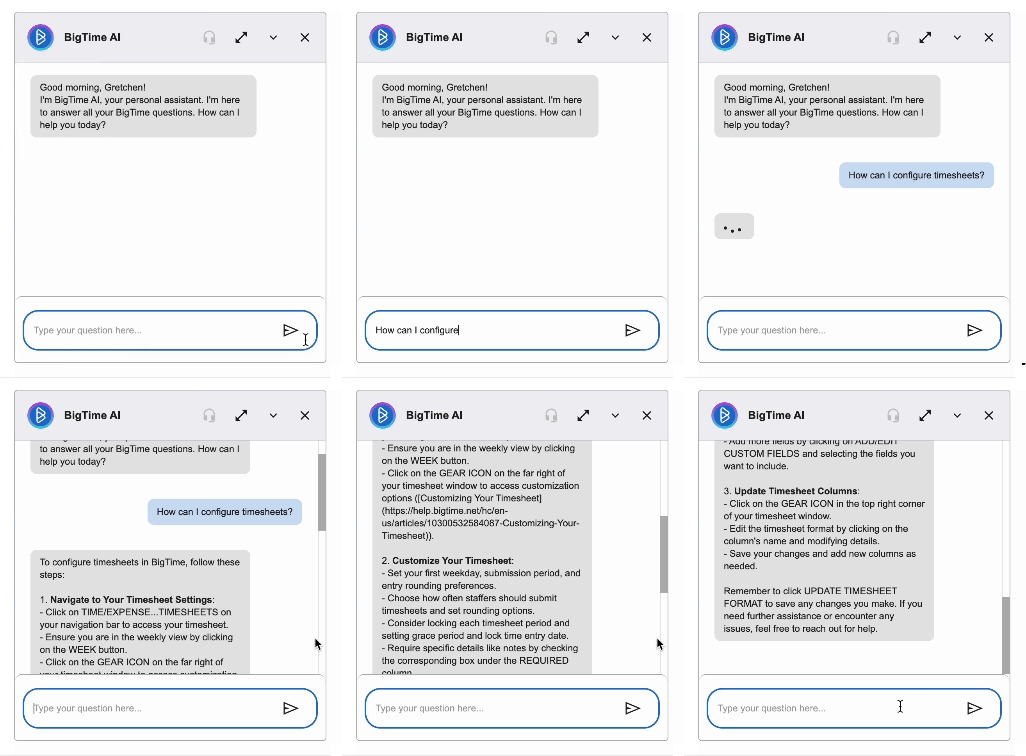
AVA leverages large language models (LLM) trained on BigTime's extensive Knowledge Base, Invoice XML, API documentation, and data dictionaries to answer your complex technical questions with simple, natural language responses. This feature is great for any customer learning how to use the BigTime product, troubleshooting common workflows, or having any foundational questions.
Key Features:
- Instant 24/7 chat support
- Personalized answers based on your subscription tier and add-on modules
- Recommendations for features that could benefit your business
- Direct connection to live product support during business hours
- In-line feedback (thumbs up / down; comments)
- Fluent in all languages
- Links to relevant Knowledge Base articles
- Query, modify, and create expenses through BigTime Expense Agent (For firms in the Early Access program only)
Personalized Support
AVA understands your BigTime setup, including your subscription and enabled add-on modules (like BigTime Quotes or BigTime Resource Management). This means AVA can give you answers specific to the features and functionalities available to you. If there are features you don't currently have access to but could benefit from, AVA will let you know.
Connect with Live Support
Need to speak to a real person? AVA can connect you directly to our live product support team during business hours (8:30 AM - 5:30 PM CST, Monday through Friday except U.S. public holidays). Whether you're interested in learning more about upgraded features or have a question that AVA can't answer, just ask and she'll connect you to our team!
Using AVA to Manage Expenses
Interact directly with your personal expenses using natural language. You can view, filter, create, and modify your unsubmitted expenses directly within the chat interface, and upload receipts (up to five at a time!) to generate expenses automatically. Expense-related actions are subject to your firm’s configuration, required fields, and approval policies. This feature is currently available to select firms only through our Early Access program. If you're interested in joining Early Access for Expense Agent, you can register your interest here.
Does this cost anything?
No, at this time there is no fee to use BigTime AI!
Which AI service is BigTime using?
BigTime AI leverages OpenAI’s GPT LLM. For more information, please review OpenAI’s Privacy and Security Articles. In the rapidly evolving field of artificial intelligence, BigTime maintains our commitment to leveraging these technologies ethically and responsibly. We are committed to working with partners who respect your privacy and uphold high data protection standards to ensure transparency and maintain your trust.
The data you use with BigTime AI is secure and you can learn more in our Privacy Policy & Security articles.
Is my data used to train AI models?
At BigTime, we deeply respect your privacy and the security of your data. The information you provide is securely stored on our internal servers and is never shared with any third parties. We use conversation history exclusively for internal research, aimed at enhancing our products and services. You can be confident that your data will never be used to train public AI models or disclosed to outside entities.
What types of questions can I ask BigTime AI?
AVA is an expert in everything that can be found in our Knowledge Base, XML or API technical documentation, and data dictionaries. See below for a few example prompts to get your started.
Sample Questions |
|
How can I enter data into timesheets? Where do I configure Bill Rates? What is the Bill Rate hierarchy? Where can I add demand for a staffer? What report is best to look at project profitability? How do I connect to QuickBooks? How can I configure my lexicon? Show my expenses from this month. (Expense Agent add-on only) Expense $60.28 to a client dinner with Acme Corp. (Expense Agent add-on only) |
Can I opt-out of BigTime AI at a future date?
Yes. Admins can turn off AVA for their firm at any time by navigating to:
My Company → My Company → Active Features → BigTime AI Assistant
Can I still contact live customer support?
Absolutely! Our commitment to providing exceptional live support remains the same. You will still be able to contact our live support team during normal business hours (8:30 AM-5:30 PM CT Monday through Friday.)
How do I provide feedback?
During each session, give a thumbs up or down in real time at the bottom of the AVA's response, or copy the message. For downvotes, you can additionally provide any commentary to help our team diagnose the issue and continue improving AVA! The product and support teams actively monitor feedback.
Can I move AVA?
Yes! You can drag and drop the icon to position the chat button in any of the four corners of your screen.
Is my data used to train AI models?
At BigTime, we deeply respect your privacy and the security of your data. The information you provide is securely stored on our internal servers and is never shared with any third parties. We use conversation history exclusively for internal research to enhance our products and services. You can be confident that your data will never be used to train public AI models or disclosed to outside entities.
View our Privacy Policy to learn more.